
Aged Invoice Report
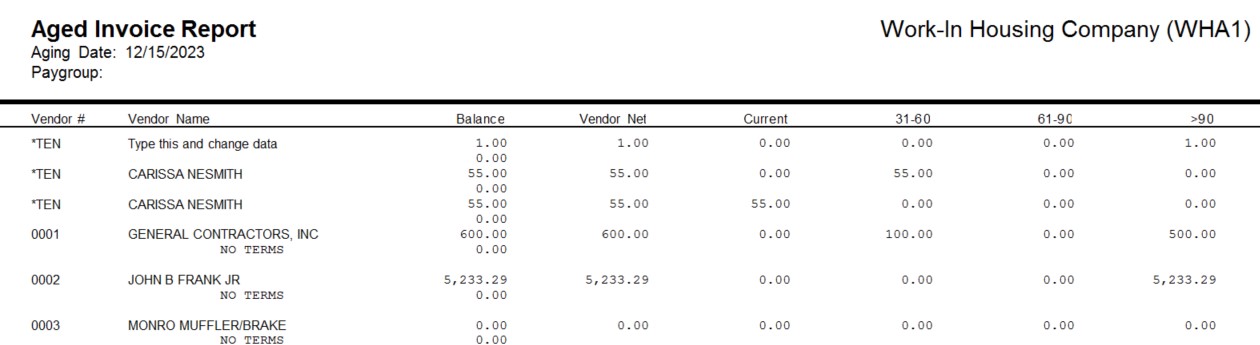
This report generates a report of all open unpaid invoices and shows their age as of the date entered.
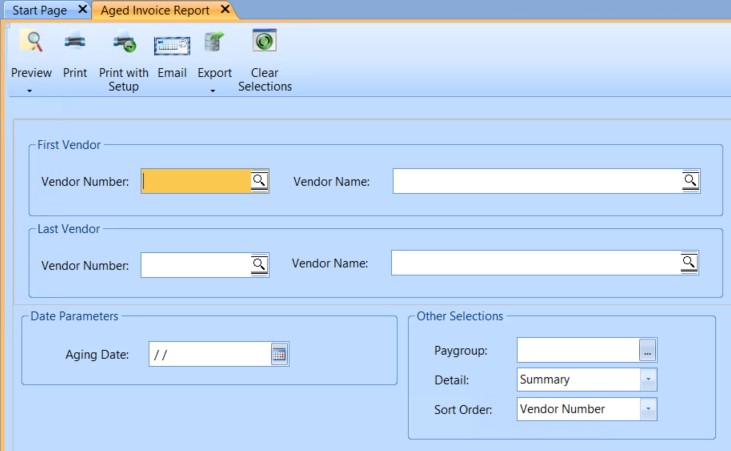
 NAVIGATION: REPORTS menu > Accounts Payable Reports > Aged Invoices
- Leave both the first and last vendor fields blank for all vendors.
- First Vendor
- Enter or select a vendor number for the report, or leave both the first and last vendor fields blank for all vendors.
- Select a vendor number and leave the last vendor field blank to generate a report for the vendor.
- Last Vendor
- Enter or select a vendor number to end the report with.
- Aging Date: Enter or select a date for the aging report.
- Paygroup: Enter or select a pay group for the report, or leave the paygroup blank to include all paygroups in the report.
- Detail: Select a level of detail for the report from the following options:
- Detail
- Summary
- Sort Order: Select one of the following sort orders for the report:
- Vendor Number
- Vendor Name
- Print, preview, or save the report (see Report Preview, Print and Save Options).
- SAMPLE
12/2023